
1. Once the Auction starts you will see a time tracker at the top which clearly indicates the time left for the completion of the Auction.
2. You can select the part you would like to bid for.
3. Click on the button under the column My Bid to decrease (for reverse auction)\increase (for forward auction) the amount by the value shown in the button.
4. Click on Submit Quote button to submit the quote for the decreased\increased amount you have selected.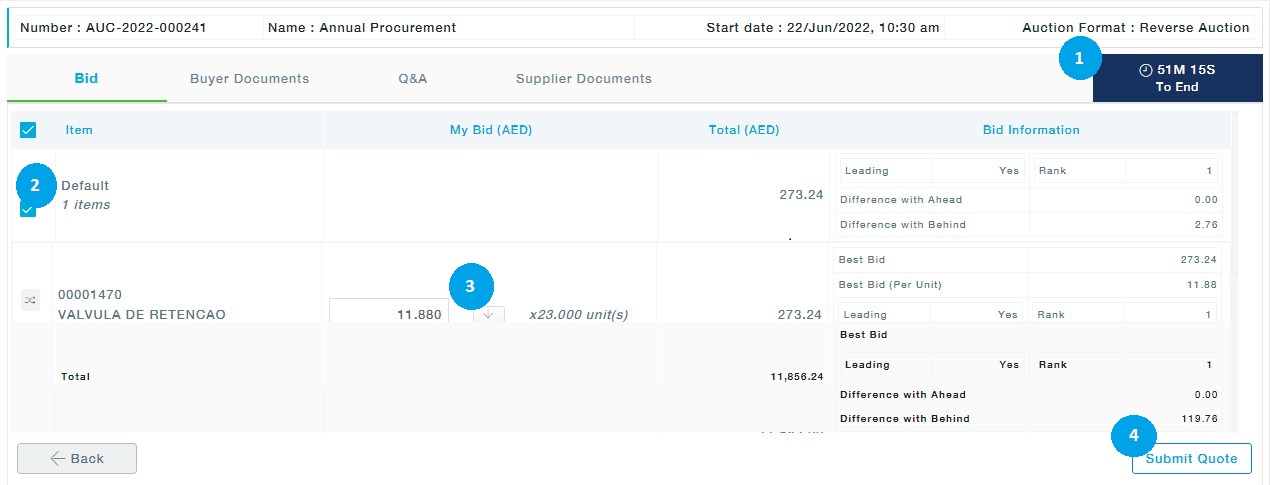
After submitting the quote, you can see your position as a participant in the auction compared with your fellow participants/competitors at any instance of time during the Auction by referring to the columns- Leading (whether you are leading in the Auction or not), Rank (Your rank in the auction for the selected item), Difference with Behind (the difference between you and competitor who is immediately behind you), Difference with ahead ( the difference between you and the competitor immediately ahead of you).
If you would like to decrease the amount and submit again, you may follow steps 3 and 4 to continue with the Auction.
Note: The decreased\increased value will be seen by the Buyer only if you click Submit quote after each reduction\increase in amount.