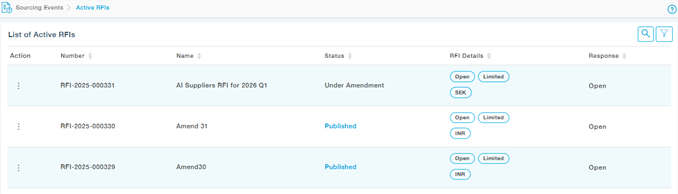
When a Buyer amends and republishes an RFI, suppliers must review the updated content and submit their responses again. Below is the process suppliers should follow:
1. Notification of Amendment
Once the Buyer publishes the amended RFI: You will receive an email notification informing you that the RFI has been amended. The email will include:
- A link to access the updated RFI
- A Change Log summarizing all modifications made during the amendment
2. Accessing the Amended RFI
You can access the amended RFI in either of the following ways:
- Click the link in the amendment notification email, or
- Log in to the Supplier Portal, navigate to the relevant RFI, and open it from your RFI list.
3. Submitting Your Response
After reviewing the changes:
- Update your responses where needed
- Click Submit to finalize your response.
When Submission Is Temporarily Locked
If the Buyer is currently performing another amendment:
- The RFI status will be Under Amendment
- During this time, you cannot submit or resubmit your response
- You will be able to continue once the Buyer publishes the newly amended version
A message will be shown in the portal indicating that the RFI is under amendment and submissions are temporarily disabled.